Territory Intelligence for realtors

Be the agent families find when they choose a neighbourhood.

Territory Intelligence puts your name in front of the families researching schools in your area, gives you a branded school and neighbourhood report for every listing, and adds School Guide to your own website.

Live demo every weekday, 1:00 to 5:00 pm Vancouver time.

Get a free listing report.

Tell us about one listing. We make a school and neighbourhood report branded with your name, photo and brokerage, and email it to you, free.

Your name, photo and brokerage go on every page of the report. Files up to 5 MB each.

Requests before 4:00 pm Vancouver time arrive the same day. Later requests arrive the next day, always within 24 hours.

One subscription, three things you use every week.

Traffic and leads are not the promise. A small, exact audience is: families who are choosing schools in the area you work.

1 area

Visibility on School Guide

Your photo, brokerage and contact shown to families browsing the schools in your sponsored area. One agent per area.

10 reports

Listing reports every month

A branded school and neighbourhood report for any Lower Mainland address.

1 embed

School Guide on your site

Add school search to your website and listing pages, so families researching schools stay with you.

Where families see you.

Two places: on School Guide itself, and on your own website.

On every school page in your area

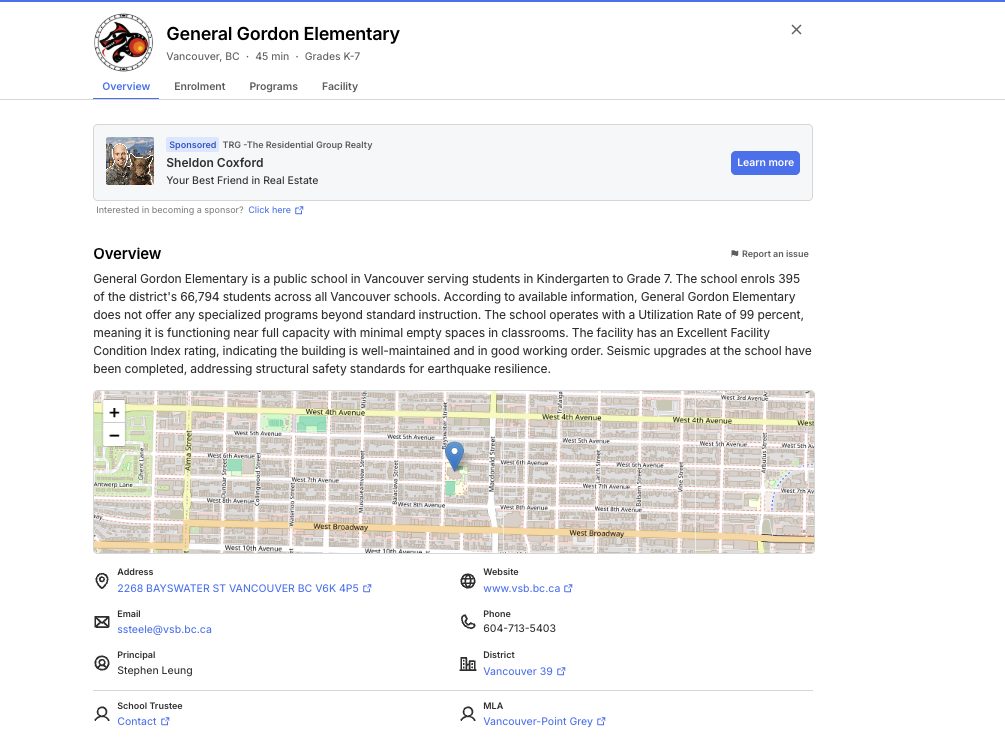
Families opening a school in your sponsored area see your card at the top of the page: photo, name, brokerage, a line about you and a link to your site.

A School Guide page for General Gordon Elementary in Vancouver, with a sponsored realtor card above the school overview showing the agent’s photo, name, brokerage, slogan and a Learn more button

A live School Guide school page with a sponsor card.

On your own website

The School Guide embed puts the same school search on your site and listing pages. Families explore schools without leaving you.

Preview: School Guide embedded on an agent’s siteOpen School Guide

Loads the live school search, as families see it on your site.

<iframe src="https://schoolguide.vtco.app/browse"
  title="School Guide" width="100%" height="620"></iframe>

The embed code in your dashboard is set up for your account.

For listing agents

Market the neighbourhood, not only the house.

Sellers choose the agent who can show what makes the location worth paying for. A school and neighbourhood report for every listing gives you that in the listing presentation, at the open house and online.

  • In the listing presentation: show the seller nearby schools, programs, parks and transit before you list.
  • At the open house: a printed report and a QR code that leads to the online version.
  • Online: a shareable link for the listing page, social posts and buyer follow-up.

A new listing, from sign-up to open house

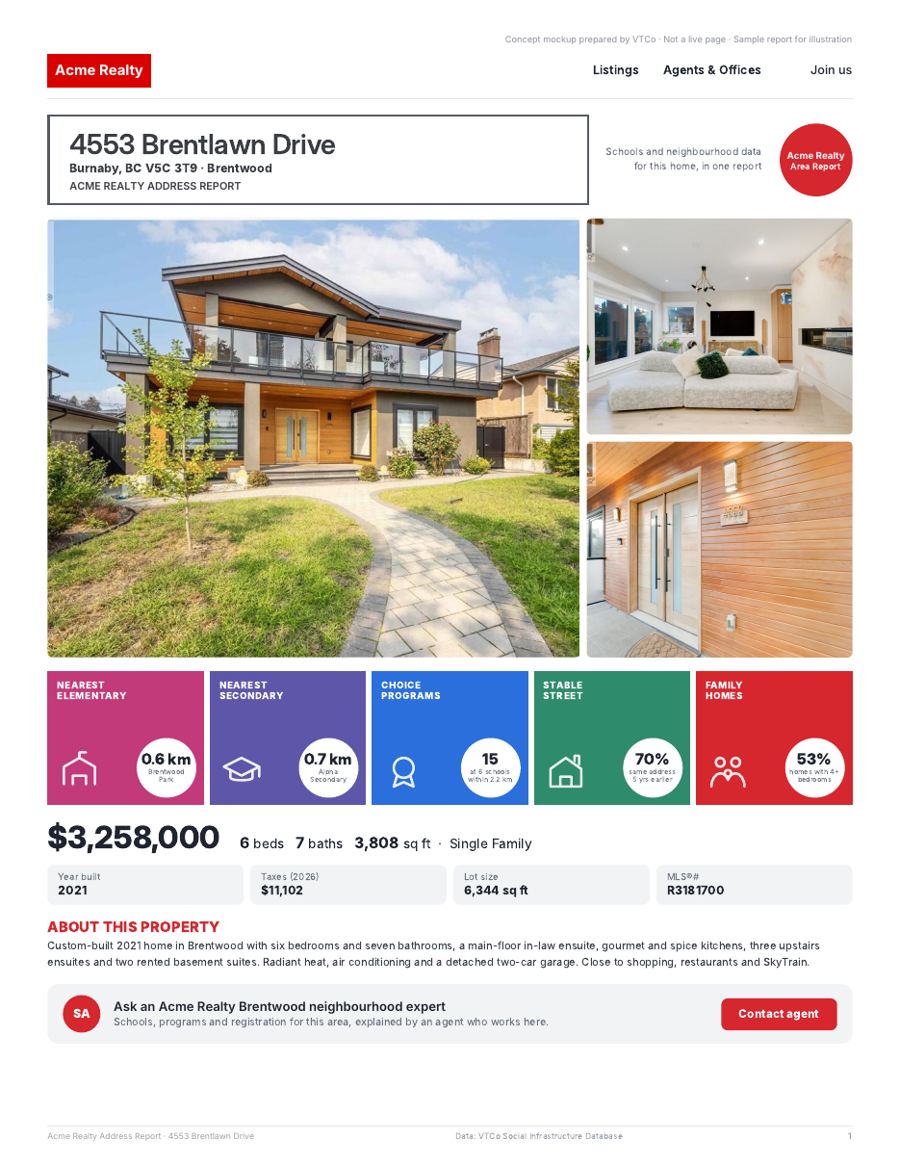
A six-bedroom house in Brentwood, Burnaby, open house on Saturday.

  1. Search the addressType the listing address in Territory Intelligence.
  2. Add the listing detailsPhotos, price, key features, the open house date and any notes.
  3. Get the reportSchools, programs, amenities, transit and maps fill in from the public record, with your name, photo and brokerage.
  4. Use it everywhereDownload the PDF for the open house and share the link with buyers and on the listing.
For buyer’s agents

Be the local schools and neighbourhood authority.

For families with children, the school is often the decision. Buyer’s agents who answer school questions with records, not memory, win the client and keep them through the search.

  • Territory presence: your profile on School Guide in the areas you work, seen by families comparing schools there.
  • Client answers: a report for any address a client is considering, to compare schools and amenities side by side.
  • Your website: School Guide search on your own site, so families start their research with you.

A family relocating with two children

Shortlisting homes in two areas, with school as the first question.

  1. Show up where they lookThe family browses schools on School Guide and sees you as the sponsor for the area.
  2. Answer the school questionMake a report for each shortlisted address and send the links.
  3. Compare with themNearby schools, programs, parks and transit for each home, from the same public record.
  4. Stay their agentEvery report carries your name and contact, so the conversation comes back to you.

What goes into a report.

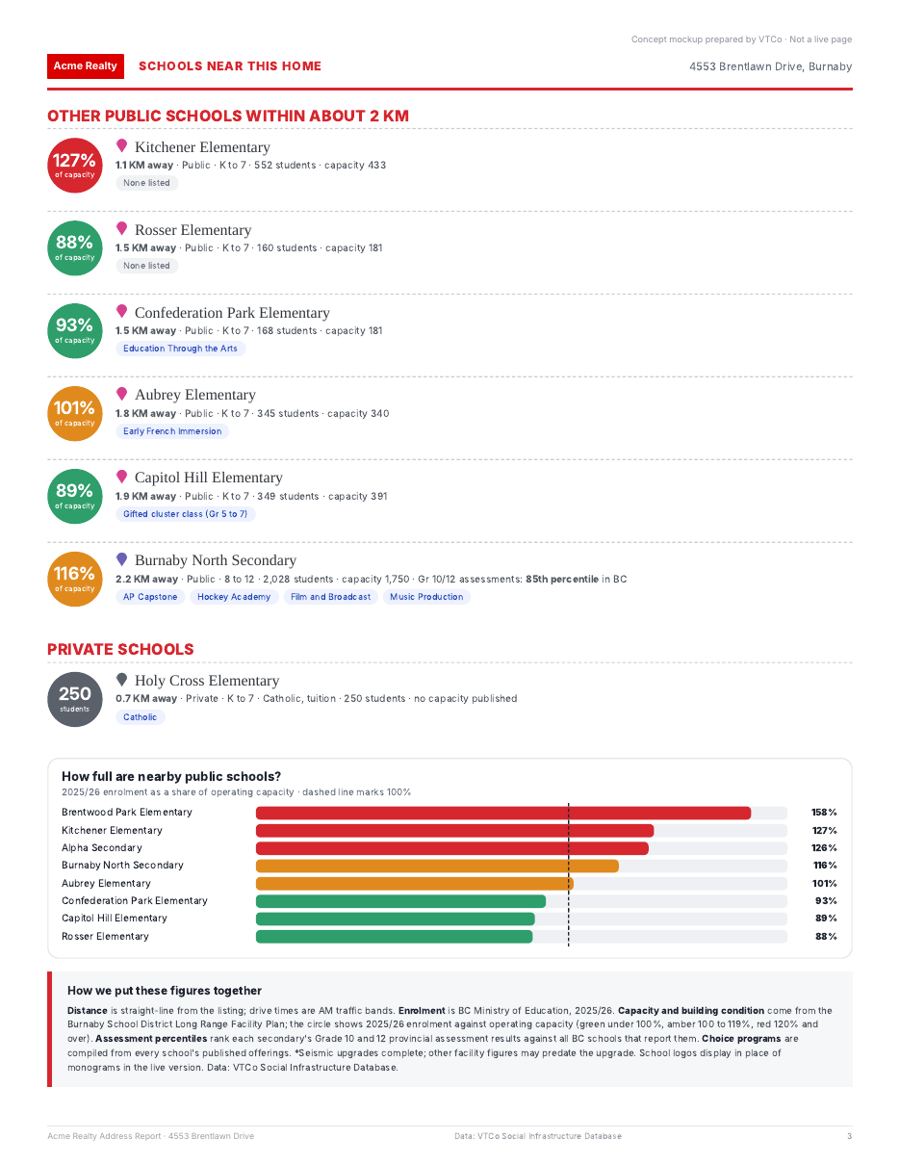
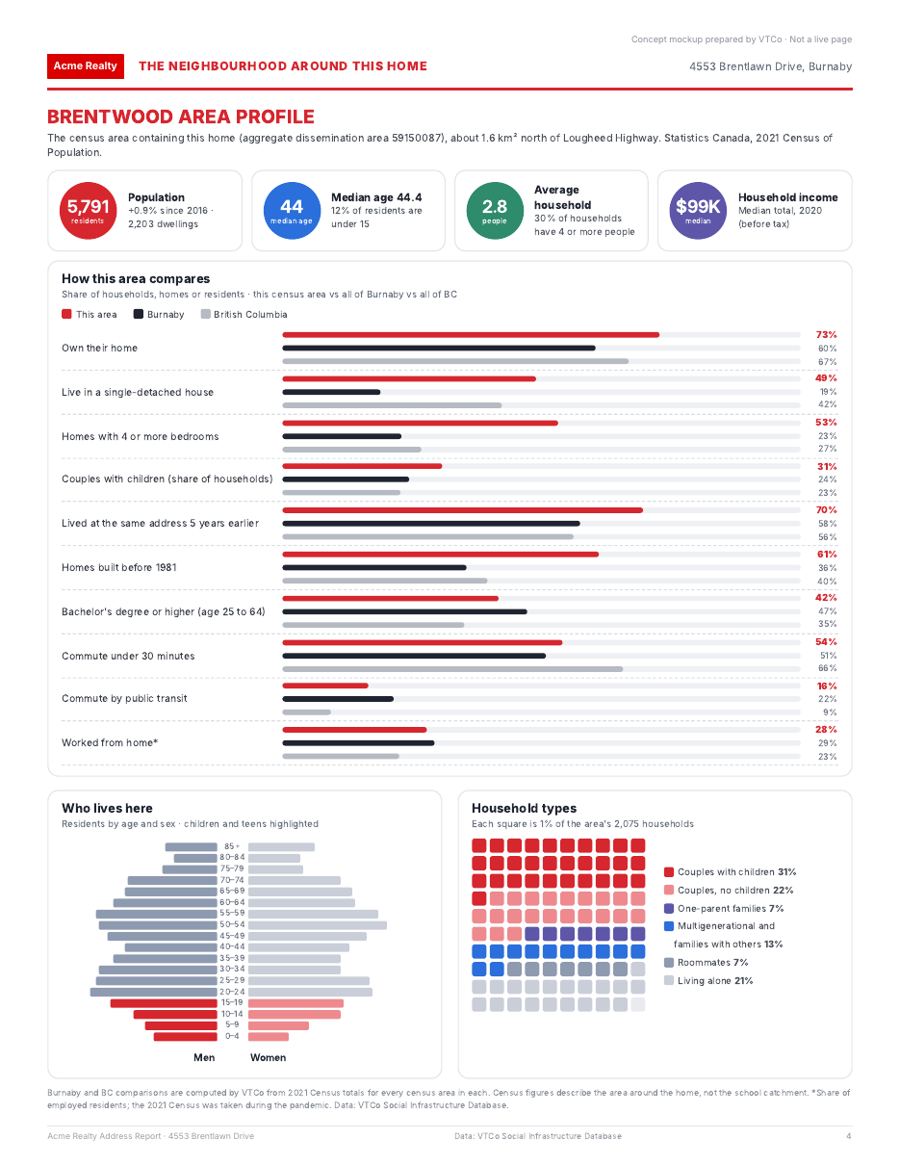
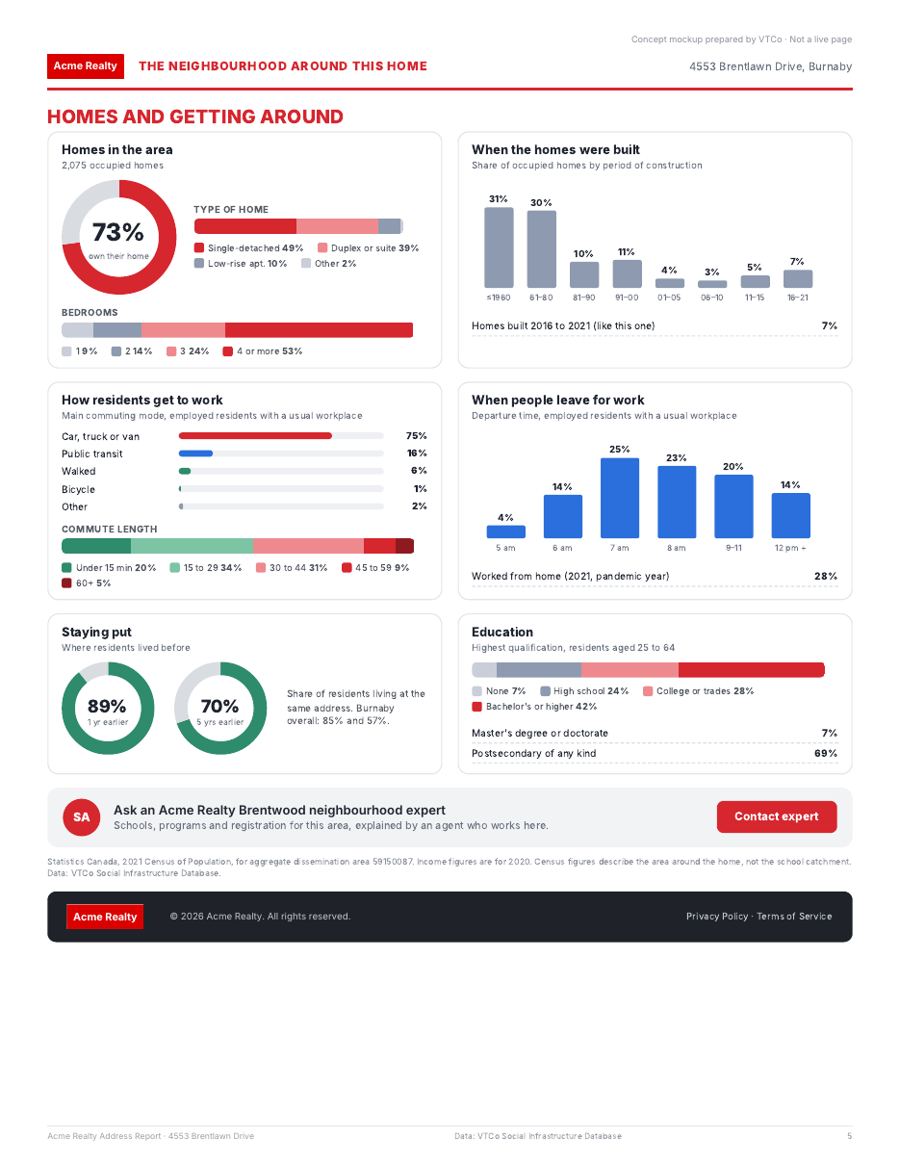
You supply the listing. Schools, enrolment, programs and the neighbourhood profile come from VTCo’s Social Infrastructure Database, which links every figure to the official publication behind it.

Reports show the nearest schools to an address, not catchments. Families confirm catchment and registration with the school district.

From you

  • Property address
  • Listing photos
  • Price and key features
  • Open house date
  • Optional notes
  • Your photo and brokerage logo

From the public record

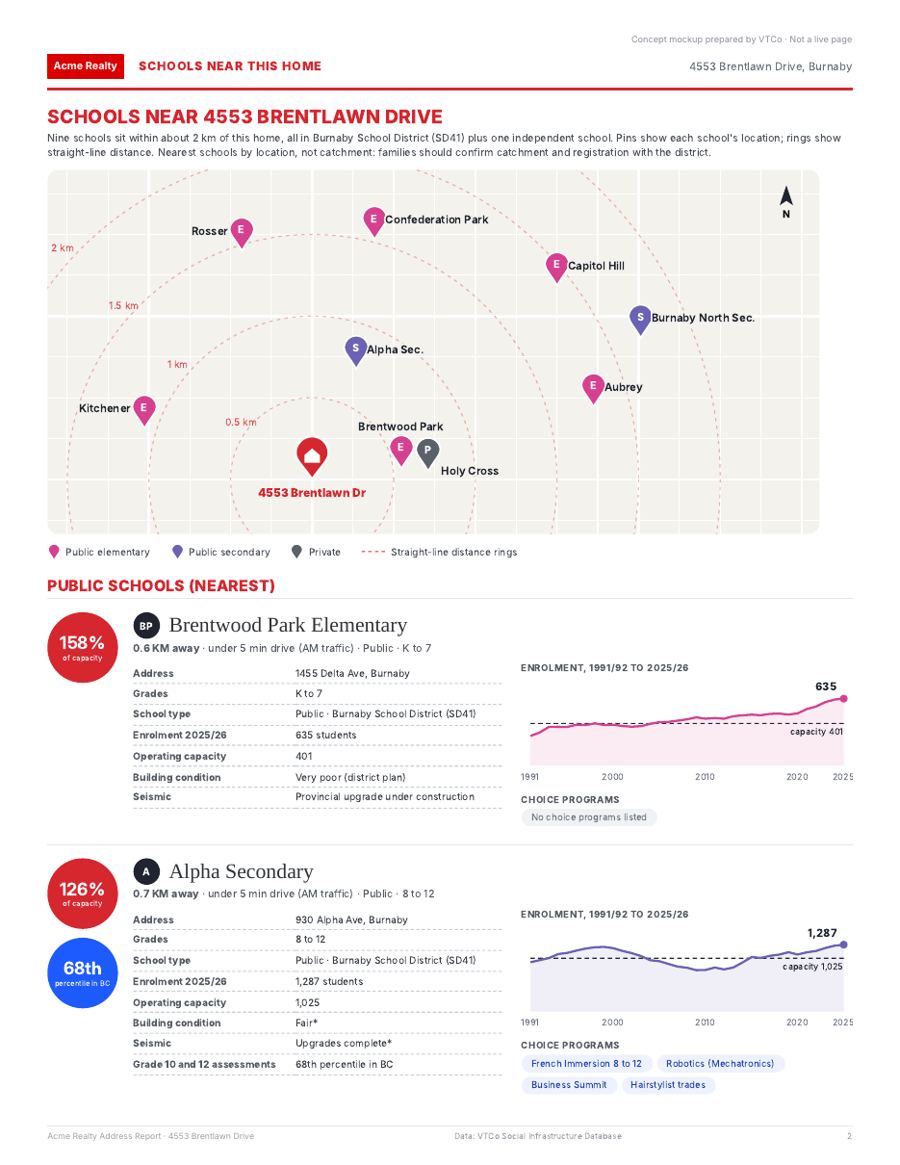
  • Nearest schools and distances
  • Enrolment against capacity
  • Choice programs
  • Building condition and seismic status
  • Area profile from the census
  • Homes and commuting

Example: a brokerage-branded report for 4553 Brentlawn Drive, Burnaby, shown for a sample brokerage, Acme Realty. Yours carry your name, photo and brokerage.

How to start.

  1. Choose your area

    Browse the map and pick an area. Each shows how many families with school-age children move in.

  2. Set up your profile

    Add your photo, brokerage, logo and contact details. They appear on School Guide and on every report.

  3. Make your first report

    Search a listing address and share the report the same day.

Common questions.

Does a sponsorship come with leads?

No. School Guide is a focused audience of families researching schools, not a lead source. You get visibility with them, and reports and the embed that start your own conversations.

Can another agent take the same area?

No. Each area has one sponsor at a time.

Can reports be made outside a sponsored area?

Yes. Reports work for any address in the Lower Mainland.

Where does the data come from?

Official public sources, collected and reconciled in the Social Infrastructure Database. The methodology explains how.

Who sees the reports?

Anyone you share the PDF or link with. Your reports stay in your account to download or share again.

Put your name on the neighbourhood.

Start with a free report for one of your listings, or see it live in a demo.